
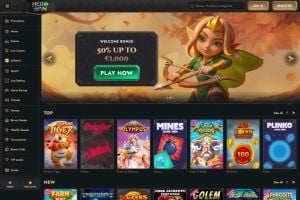

A busy gambling homepage can make simple choices feel harder than they should. Menus may combine casino games, live tables, jackpots, promotions, account tools and sports betting, while important conditions sit in separate areas. The Australia-facing official herospin casino site illustrates why a clear browsing method matters: its lobby offers many categories, but each one serves a different purpose. Treat the homepage as a navigation system rather than a recommendation engine, and you can compare what is available without assuming that visibility means suitability, availability or value.
Start by separating the homepage into its main routes

The first useful distinction is between the casino lobby, live casino, jackpots and sportsbook areas. These routes may appear beside one another in the main navigation, but they lead to different types of activity. The casino lobby is organised around digital games, the live area around streamed or hosted tables, and the sportsbook covers sporting markets. Selecting the correct route before browsing prevents a search for a particular game format from becoming mixed with unrelated promotions or betting products.
Within the casino route, the menu is divided into broad discovery groups. Top, New and Popular are designed for quick browsing, whereas All Games is more comprehensive. Megaways, Bonus Buys and Instant Games describe particular formats or mechanics. Pokies and Table Games are wider genre choices. A user who wants a conventional table game should begin with that category, while someone comparing newer releases may find the New Games section more efficient than scrolling through the complete catalogue.
Jackpot navigation deserves separate treatment because it is not simply another name for ordinary games. Sections such as Hot Jackpots, Lucky Jackpots, New Jackpots, Drops & Wins and Daily Jackpots suggest different ways of grouping jackpot titles. The labels can help narrow a search, but they do not establish the size, frequency or likelihood of a prize. Availability may also vary by location, account status or game section, so the individual title information remains more important than the menu label.
Which menu should you use for a particular search?
Use a simple question-and-category method. If the aim is to browse by release status, choose New. If popularity is the deciding factor, choose Popular or Top. If the preferred style is a live dealer environment, go directly to Live Games rather than using the general table-game menu. For a specific provider or title, the search function, where available, is usually more efficient than opening every category and relying on visual scanning.
Live casino menus can contain several layers, including roulette, blackjack, baccarat, poker, dice, game shows, international tables and specialised rooms. These labels are useful because they separate the game family from the presentation style. However, a category name does not guarantee that every displayed table will remain available. Table numbers and individual titles can change, and a reviewer’s observed selection is only a snapshot rather than a permanent catalogue.
For digital games, provider names can be another practical filter. The catalogue lists studios such as Play’n GO, Pragmatic Play, Evolution, NetEnt, Quickspin and many others, although provider availability and individual titles may differ by section or location. Filtering by provider can reduce browsing time, but it should not be treated as an endorsement of a game’s return, volatility or quality. Those characteristics must be assessed from the game’s own information where it is supplied.
Use promotional areas without losing the ordinary lobby
Promotions, challenges, tournaments, Bonus Crab, Wheel of Fortune, the shop and VIP levels appear as additional navigation routes. They may be prominent because they are designed to attract attention, but they are not necessarily the best starting point for someone who simply wants to inspect games. Opening the standard lobby first gives a clearer view of the catalogue before promotional language influences the choice of category.
Promotion pages should be read as conditions pages, not as shortcuts to a better browsing experience. The supplied Australia-facing terms describe a welcome package split across qualifying deposits, with wagering requirements, expiry periods, maximum-bet rules, game contribution differences and restrictions on combining offers. Other conditions cover payment methods, withdrawals made before or during an active offer, and limits on the amount that can be released. These details can affect how an offer works more than its headline figure.
Before selecting a promotion, check whether it is optional, how it is activated, which deposit methods qualify and what happens if it is cancelled. The terms supplied for this brand state that a bonus can be cancelled from the profile area, but cancellation removes the remaining bonus balance. Readers should also check the current promotion page and account terms because conditions may change. A visible banner should never be treated as proof that an offer applies to every user or every payment route.
Check the account and payment paths before relying on the menu
A usable homepage should make account actions recognisable even when they are not part of the game lobby. Registration, login, password recovery, profile details, My Bonus and the cashier serve different purposes. Keeping them separate helps avoid an easy mistake: assuming that a promotion page is the same as an account-management page. If a recovery message does not arrive, confirm the registered email or phone identifier and check junk folders rather than repeatedly creating new credentials.
The cashier is especially important because payment options can differ by account and country. Reported Australian-facing methods include cards, PayID, Neosurf, Skrill, Neteller, Jeton, MiFinity, Cash2Code, bank transfer and some cryptocurrency options, but the cashier is the practical reference for what is enabled. A method shown in general information may not be available for both deposits and withdrawals. Minimums, limits, fees, conversion costs and verification requirements should be checked immediately before a transaction.
Identity information should also be consistent across the account and payment method. The supplied registration material says applicants may need to provide personal details, while checks can request photo identification, proof of address or evidence that a payment method belongs to the account holder. That means navigation is not just about finding a game; it also involves knowing where account details and verification requests are handled. Do not upload documents through an unfamiliar page or share passwords and one-time codes with anyone.
Make mobile browsing and support part of the plan
The service can be reached through a mobile web browser, allowing the lobby and account pages to be viewed on a smartphone-sized screen. Browser access should not be confused with a native application. The supplied material reports no dedicated mobile app, so an app-store listing or downloadable file should not automatically be assumed to be official. Using the operator’s normal website address and checking the browser address bar is a more cautious way to reach the mobile layout.
Small screens make menu discipline more valuable. Open one category at a time, close filters that are no longer needed and verify the selected game or account section before taking action. A phone can make promotional banners and navigation tiles look more prominent than their desktop equivalents. If a page behaves unexpectedly, avoid repeated taps that could select a purchase, bonus or wager unintentionally. A stable connection and current browser can also reduce display problems, although they cannot resolve account or availability restrictions.
Support should be treated as another route to verify unclear navigation. The supplied information identifies a Help Centre, live chat and an email support address, while an Australian review reported that live chat did not respond during testing and that no telephone number was displayed. If a support channel fails, record the issue and use the available alternative rather than sending duplicate requests. For separate self-exclusion support, the official BetStop self-exclusion register is relevant to licensed Australian wagering services; it is separate from the operator’s own account controls.
Homepage navigation FAQ
Does a game category confirm that a title is available to me?
No. Categories are browsing tools, not guarantees of access. Titles, providers, tables and promotional functions can vary by location, account status and current platform settings. Open the individual game or terms display and check the current account view before relying on a category listing.
Is mobile browser access the same as having an official app?
No. A responsive website opens through a browser, while a native app is installed through an app store or authorised package. The supplied information describes mobile browser access but does not confirm a dedicated app. Avoid unofficial downloads and check the web address before entering account details.
Where should unclear bonus or payment information be checked?
Use the current promotion terms, profile area and cashier as the primary references. These sections may show eligibility, payment availability, wagering conditions, limits and verification requirements that are not visible in a homepage banner. If wording remains unclear, contact support before activating an offer or confirming a transaction.